Clovoso: cinematic website templates and the AI prompts behind them

Build a single-screen hero section for {{BRAND}}, {{NICHE}}.

Scroll-driven website templates, and the AI prompts that build them.

“Build a single-screen hero section for {{BRAND}}, {{NICHE}}.”

Cinematic websites,one prompt away.

Pick a title.Watch it move.

Each preview is a real site built from a single prompt. Choose one to put it on the screen.

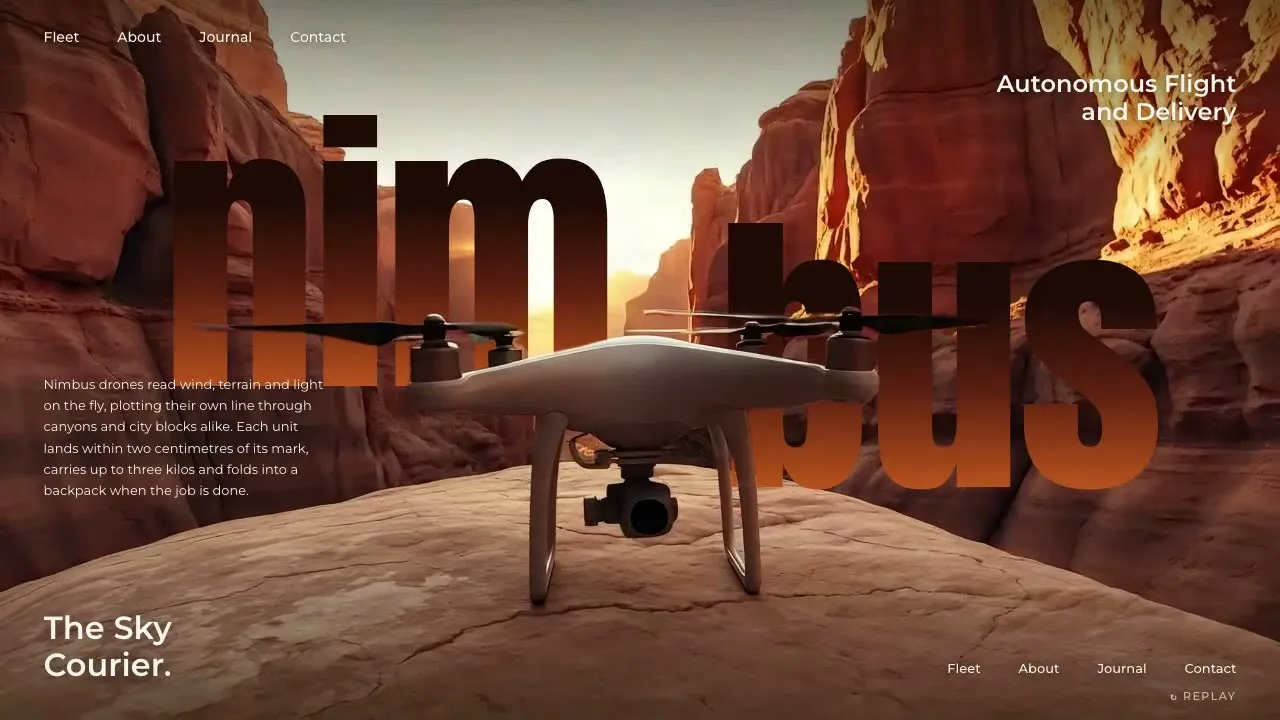
Nimbus Aero

Fly-in landing hero + subject-over-wordmark

Open the prompt

The library

Every preview comes with the prompt that made it. Open one, copy it, and paste it into Claude, Cursor or v0.

39 templates. Lifetime access unlocks every Pro prompt.

Copy. Paste.Launch.

  1. Step 1

    Pick a prompt

  2. Step 2

    Paste it into your AI

  3. Step 3

    Launch it

Website prompt, Nimbus Aero

Build ONLY a single-screen cinematic HERO SECTION for {{BRAND}} ({{NICHE}}) in the "fly-in landing + subject-over-wordmark" style — one 100svh block, no other sections, no page scroll. It must drop into an existing page as-is. Stack: plain HTML/CSS/JS (or React) + GSAP 3, Google Fonts. The centerpiece is my clip `asset.mp4` ({{DURATION}}, 16:9): {{SUBJECT}} travels in from far away, grows toward camera and lands/settles dead-center in the foreground, then holds still.…

yourbrand.com

Want one built for you?

Our studio takes on a few client sites each month. Those builds never go into the library.

Start a project

Every prompt.Pick your plan.

Join 6,100+ builders shipping cinematic sites with Clovoso.

  • Every template, component, shader, section and UI screen
  • New prompts every Friday, for as long as Clovoso runs
  • Use them for yourself and for client work
  • FREE

    $0

    3 copies a day

    Free templates only

  • MONTHLY

    —/mo

    Unlimited copies

    Every template

  • ANNUAL

    —/yr

    Unlimited copies

    Every template

  • LIFETIME

    $299

    Unlimited, forever

    Every template

One email a week. Unsubscribe any time.

3D WebsitePro

Lowmoor

Chaptered 3D particle descent + live counter HUD + chapter index + masked headlines + flow-field finale

A dark, chaptered 3D website. A fixed full-bleed particle field morphs into a new formation for every chapter as you scroll (loose dust, a tilted spiral disc, concentric rings, a bright dense core, dispersing dust, then flowing streaks), over a dim scroll-scrubbed clip. A fixed HUD counts a running number and takes on each chapter's accent colour, a chapter index on the right marks where you are, and each chapter's giant uppercase headline rises line by line out of masks, then blurs away before the particles re-form. The last chapter is empty but for short whisper lines that decode into each other, then a footer rolls up over the field.

  • Layers (all fixed, full-bleed): a canvas scrubbing the clip's frames by whole-page scroll progress at low opacity (~0.1-0.4, brightest in the climax chapter); above it a 2D canvas drawing a 3D particle field (perspective projection, additive 'lighter' blend, 3 brightness groups per frame); a radial vignette + fine grain veil on top.
  • HUD (fixed top-left): brand in parentheses in small spaced mono caps, a bracketed tagline in dim mono caps, then a live counter in mono (tabular figures, thousands separators, a tiny unit) and a dim mono label under it. The counter interpolates between each chapter's value as you scroll and its colour tweens to the chapter accent.
  • Chapter index (fixed top-right): 7 chapter names in tiny mono caps, right-aligned, dim; the active one turns bright with a small accent dot that glows. Each name is a link that smooth-scrolls (Lenis scrollTo) to its chapter. On phones only the active name shows.
  • Chapters (7 empty scroll spacers ~110-130vh, last one ~220vh): the copy is a fixed overlay; only the active chapter's copy is visible. Left chapters: a 3-4 line uppercase headline in a heavy, slightly condensed grotesk (~7.4vw, line-height .88, tight tracking) bottom-left with a bracketed mono caption under it; bottom-right a narrow column with an index like '( III ) — CHAPTER NAME', a short paragraph and a mono caps link with an arrow. One chapter (the climax) lifts the headline to ~30vh. The 'hold' chapter centres the headline, caption, paragraph and link with a soft dark radial scrim behind them.
  • Headline motion: on entering a chapter each line rises from yPercent 112 to 0 inside an overflow-hidden mask (expo.out, 0.09s stagger); caption and side column fade up after; the paragraph decodes from random glyphs (scramble). On leaving (around 60% through the chapter) the lines blur to 10px, grey out, drift up and fade, before the particle formation starts to change.
  • Particle formations (one per chapter, morphing over the last ~38% of each chapter with a per-particle stagger so they dissolve and re-form, never jump): 1 loose dust drifting upward; 2 a three-arm spiral disc tilted ~60 degrees, rotating slowly, haze between arms; 3 concentric rings near face-on, alternate rings rotating at different speeds; 4 a dense bright two-arm core with a glow boost toward the centre (the clip layer is brightest here); 5 wide dispersing dust; 6-7 a divergence-free curl-noise flow field with a steady drift, drawn as line segments from each particle's last screen position over a canvas that only fades ~10% per frame, so it reads as long silky streaks. Colours are the chapter accent mixed toward white in three steps.
  • Final chapter: no headline. Short whisper lines in a light grotesk appear at different positions; each new line decodes in place out of the previous one, then dissolves and reappears at the next spot. Then the footer: brand, a two-line blurb, bracketed tagline, three link columns, and a bottom bar (copyright, a mono detail line, 'back to top' link) on a gradient that rises over the field.
  • Pointer: gentle parallax only (the particle camera shifts a little toward the pointer, lerped). No drag handles, sliders or custom cursor. Links brighten on hover, arrows nudge right.
  • Loader (#loader, gets .is-done): brand in parentheses, a big condensed % counter in the accent, a bracketed sub-line and a thin progress line. Frames preload in chunks; frame 0 and the first particle frame are drawn and the intro start states set before the loader fades; the intro (HUD items stagger in, index slides in, first headline rises) starts when the loader lifts. An inline <head> script adds .js-intro so HUD, index and first chapter are hidden before first paint.
  • Reduced motion: native scroll, particles snap to each formation without drift or streaks, copy switches without masks or scramble, only 4 key frames load. Mobile: native 9:16 frame crop, ~3,200 particles drawn smaller with formations raised to ~36% height, headline above a full-width side column, only the active chapter name in the index.
The full prompt unlocks when you copy it

Fill these in to make it yours